Qivronel
Flux Module
Flux Module
Couldn't load pickup availability
1. Problem Statement
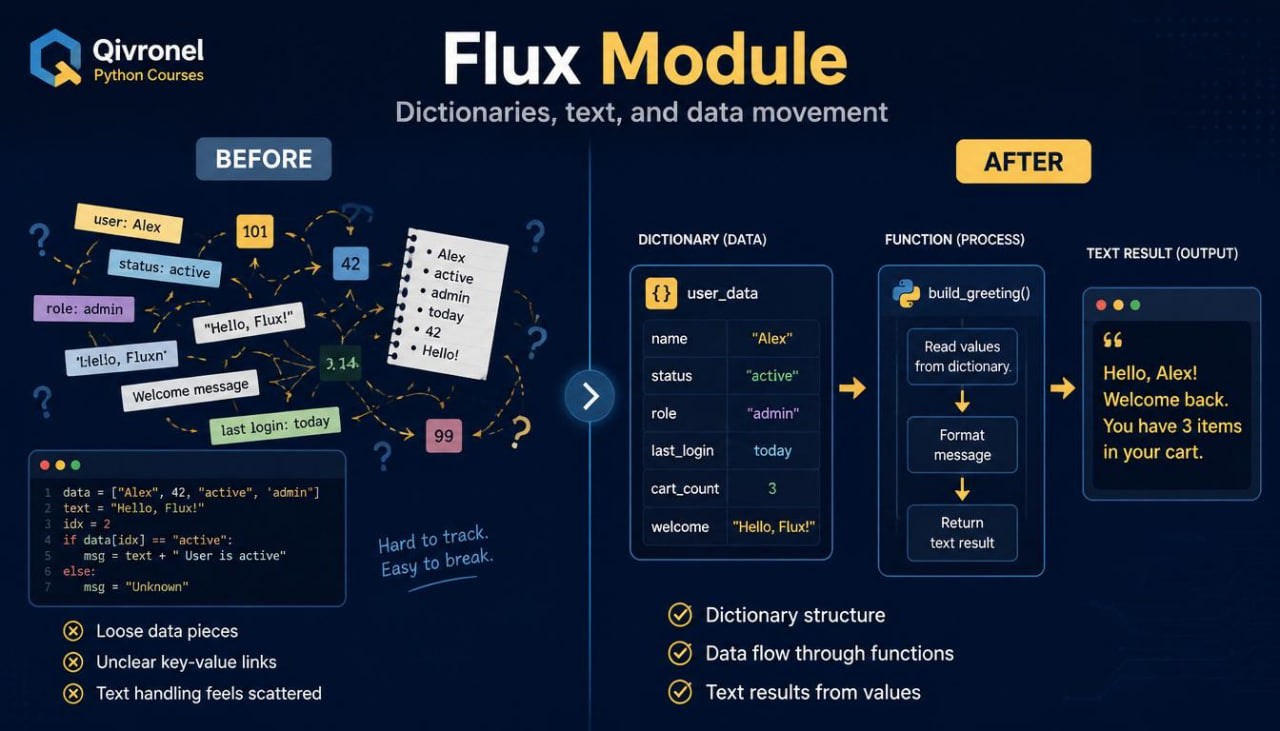
After getting familiar with functions, a learner often meets situations where lists are not always enough for storing learning data in a convenient way. For example, when a name needs to be connected with a value, a topic with an exercise count, or a label with a description, a regular list may feel too limited. There is also a need to better understand how to work with text, move through value pairs, and pass such structures into functions. Without separate explanation, dictionaries may seem difficult because they include keys, values, nested elements, and their own reading logic. Flux Module is created for the stage where the learner needs to work with data more flexibly and see how separate code parts flow into one another.
2. Solution
Flux Module explains how to use dictionaries, text operations, functions, and loops in more connected learning examples. The materials show how to store data in a “key — value” format, how to move through such structures, and how to get the needed part of the information. The learner sees how functions can receive dictionaries, change them, return summaries, or work with separate values. Separate modules focus on text: finding fragments, changing letter case, splitting strings, and creating short text results. This format helps the learner move from basic constructions to more organized learning scenarios.
3. What’s Inside
Flux Module expands earlier Qivronel topics and adds work with dictionaries, text, combined structures, and small learning scenarios. If Frame Bundle focused on functions and dividing code into parts, Flux Module shows how those functions can work with more meaningful data.
The first module begins with a review of lists and functions. The learner returns to examples where a list is passed into a function, moved through with a loop, and used to form a summary. Then the materials gradually show where a list may not express enough detail. For example, a list of numbers works for a basic value set, but when each value needs a name or description, another structure is more suitable.
The second module introduces dictionaries. A dictionary is explained as a structure where each item has a key and a value. The learner sees examples with learning topics, short descriptions, scores, block names, and numerical indicators. A separate explanation covers why a key should be readable, how to read a “key — value” pair, and how to get a specific value by its key.
The third module focuses on creating and changing dictionaries. The learner studies how to add new pairs, change values, check whether a key is present, and remove an item in a learning example. The materials present these actions through short code fragments with an explanation of each line. This helps show that a dictionary is not a fixed list, but a structure that can change during code execution.
The fourth module explains how to move through a dictionary with a loop. The learner sees how to review keys, values, or key-value pairs separately. Examples use small data sets: course topics, exercise counts, section names, and short text labels. The review shows that a loop can do more than show data; it can form a summary, count items, or select needed values.
The fifth module combines dictionaries with conditions. The learner works with examples where a value needs to be checked, items need to be found by a condition, or a new summary needs to be created from a dictionary. For example, code can review learning topics and select those where the exercise count is higher than a chosen number, or check whether a needed key is present in a dictionary. These tasks connect previous knowledge with the new structure.
The sixth module focuses on functions and dictionaries. The learner sees how to pass a dictionary into a function, how a function can read values, change an item, or form a text summary. The materials explain how not to confuse a variable, parameter, key, and value. This is an important block because the learner starts to see how different code parts work together.
The seventh module moves to text operations. The learner works with strings: changes letter case, checks whether a fragment is present, splits text into parts, and joins elements into a new string. Examples are built around learning labels, topic names, short messages, and description fragments. The goal of this block is to show that text in code can be stored and also processed.
The eighth module combines text and dictionaries. The learner sees how to create a dictionary with text keys, how to format a result, and how to build a short report from data. For example, code can move through a dictionary with topics and task counts, then create several summary lines. This helps the learner work with data not as separate values, but as a small structure.
The ninth module includes learning scenarios. They combine dictionaries, lists, functions, conditions, and text operations. Tasks may ask the learner to create a topic set, count values, find a needed item, update data, or form a short summary. These exercises avoid unnecessary complexity but train the learner to see the connection between different topics.
A separate block focuses on mistakes. It covers situations where the learner refers to a key that is not present, confuses a key with a value, changes the wrong item, or reads a nested structure incorrectly. Each mistake is shown through a small example, followed by an explanation and careful review.
Flux Module also includes a mini glossary. It explains terms such as dictionary, key, value, item, update, lookup, string method, format, and nested data. Each term has a short explanation and an example in the context of learning code.
The final block brings all tier topics into one learning example. The learner works with a data set, a processing function, conditions for checking, and a text result. The task is focused not only on writing code, but also on explaining the structure: where data is stored, where it is checked, where it is processed, and where the summary is formed.
4. Who Is This For?
Flux Module is for learners who are already familiar with functions, lists, conditions, and loops. Before starting this tier, it is helpful to read small examples with functions and understand how values are passed through parameters. This is not the first starting tier, but the next step for those who want to work with more meaningful learning data.
This tier is useful for learners who want to better understand dictionaries and text operations. If lists are already familiar but the “key — value” structure still raises questions, Flux Module gives dedicated space for this topic. The materials also fit learners who want to read examples where several structures work together.
The tier is created for self-paced study with gradual topic development. The learner can return to examples, review the glossary, repeat exercises, and compare personal explanations with recap sections in the materials.
5. What You’ll Learn
- How to review lists and functions before working with dictionaries.
- How to understand a dictionary as a “key — value” structure.
- How to create dictionaries with text and numerical data.
- How to get a value by key.
- How to add, change, and remove dictionary items.
- How to check whether a key is present.
- How to move through dictionary keys, values, and pairs.
- How to combine dictionaries with conditions.
- How to pass a dictionary into a function.
- How to form a summary from dictionary data.
- How to complete basic text operations.
- How to change letter case, split a string, and join text parts.
- How to combine text, functions, and dictionaries.
- How to notice common mistakes when working with keys.
- How to read small learning scenarios with several structures.
6. Payment Return Terms
For Flux Module, there is a 30-day period for contacting support about payment return, according to the store rules. If the material format or tier content does not match expectations, the buyer can write to support during this period. Requests are reviewed based on the terms for digital learning materials and the specific order. Before choosing this tier, the learner can review Free Kit to see the Qivronel explanation style through the introductory set. Flux Module is created for learning through modules, examples, exercises, review, and careful work with structured data.
Self-paced learning overview
- 💾 Digital file available after purchase
- 🗂️ Long-term availability
- 🔐 Secure checkout
- 🗓️ Content updated in 2026
What format are the course materials provided in?
What format are the course materials provided in?
Qivronel materials are prepared in a digital format for self-paced study. Each tier includes learning blocks, explanations, code examples, practice tasks, and short recap sections. The structure is made so the learner can move through the topics gradually without too many new details at once. The materials are intended for personal study at a comfortable pace. The main focus is clear Python explanation, code logic, and practical topic review.
Is the course suitable for beginners?
Is the course suitable for beginners?
Yes, the starting Qivronel tiers are suitable for learners who are just getting familiar with Python. Topics are presented in stages: from basic ideas to simple examples and small practice tasks. A learner does not need previous preparation to begin with the first tier. Higher tiers add more topics, examples, exercises, and learning scenarios. This allows each learner to choose a tier that matches their current stage and study goal.
How are the tiers different from each other?
How are the tiers different from each other?
The tiers are arranged in growing order by material volume, number of topics, depth of explanation, and practice tasks. Starting tiers introduce Python basics and offer a short learning start. Middle tiers add more structure, examples, exercises, and review. Higher tiers include a wider set of topics, additional learning materials, independent tasks, and more expanded explanations. This lets the learner choose the amount of material that fits their current study stage.
Share